

Zoom Workplace
By zoom.com
Directory Specifications
- Platform Requirements
- Android 8.0+
- Initial Download Size
- Varies with device
- Publisher Version
- Varies with device
- Official Developer
- zoom.com
- Google Play Installs
- 1B+
- Connectivity
- Internet Required
- Monetization
- Free (In-App Purchases)
- Game Zippy Directory Views
- 21 views
- Google Play Store Referrals
- 3 referrals
- Listing Last Updated
- Oct 30, 2026
Note: "Google Play Installs" represents estimated lifetime store installations reported by the publisher on Google Play. "Google Play Referrals" counts outbound clicks from Game Zippy to the official store listing.
Screenshots & Interface Preview
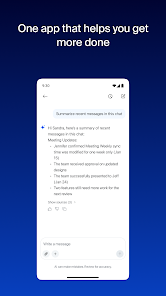
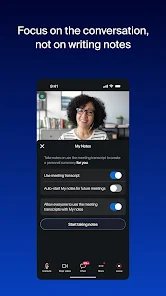
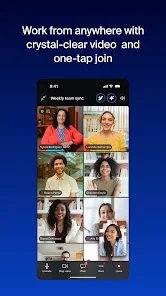
Zoom Workplace is your AI-first collaboration platform for meetings, chat, phone calls, docs, calendar, mail, whiteboard, and more. Whether you're working remotely, in the office, or on the go, Zoom Workplace helps your team stay connected and get work done — all from a single app.
With core AI features built in, you get help prepping for meetings, taking meeting notes with My notes, catching up on messages you missed, and drafting content faster.
GET MORE DONE ON THE GO WITH ZOOM AI*
Built-in AI notetaker for AI-generated meeting summaries
Draft messages and content with AI that knows your work context
Catch up on unread Chat messages in seconds
ONE APP FOR VIDEO CONFERENCING, CHAT, AND CALLS
Schedule or join a video meeting with one tap
Send messages to colleagues and external contacts in Team Chat
Place and receive phone calls or send SMS text messages with Zoom Phone*
BOOST YOUR PRODUCTIVITY
Create and share Zoom Docs to keep your team aligned
Get automatic meeting summaries
Brainstorm and collaborate on Zoom Whiteboard
SWITCH BETWEEN DEVICES WITHOUT MISSING A BEAT
Move a live video call or phone call between devices with one tap
Start a Zoom Rooms meeting and share your screen*
Multitask on your Android phone with Picture in Picture or tablet with Split Screen
WORK SAFELY ON THE GO
"Hey Google" Voice Access commands for hands-free control
Keep your data protected with enterprise-grade security and SSO*
Zoom Workplace combines the collaboration tools teams rely on — video conferencing, team messaging, cloud phone, document editing, virtual whiteboard, calendar, and email — into one simple app. It's designed to help you spend less time switching between tools and more time focused on what matters.
- A paid Zoom Workplace subscription or other license may be required to use certain product features. Upgrade your free account today to start gaining these benefits. Zoom AI may not be available for all regions and industry verticals. Some features not currently available across all regions or plans and are subject to change.
UPGRADE YOUR FREE ACCOUNT TO ZOOM WORKPLACE PRO AND GET AI INCLUDED
Host unlimited meetings up to 30 hours each
Record meetings to the cloud (up to 10GB)
Assign meeting co-hosts and schedulers
Your Zoom Workplace Pro subscription will automatically renew unless you cancel at least 24 hours before the end of the free trial or the plan billing period. After you start your subscription, you can manage it from the Google Play app. The amount charged to the payment method in your Google Play account will vary by the plan you select and your country. The plan price will be displayed before you start your free trial or confirm your purchase.
We'd love to hear from you! Join the Zoom community: https://community.zoom.com/
Follow us on social media @zoom
Terms of Service: https://www.zoom.com/en/trust/terms/
Privacy Statement: https://www.zoom.com/en/trust/privacy/privacy-statement/
Have a question? Contact us at https://support.zoom.com/hc
About Zoom Workplace
Zoom Workplace brings the tools a team normally spreads across several apps into one place on your phone. Meetings, team chat, phone calls, documents, calendar, mail and whiteboards all sit inside a single sign-in, so moving from a message thread to a live call takes a tap rather than an app switch.
The app is built for hybrid and on-the-go work. You can start a meeting on your phone, hand it over to another device, keep chatting in picture-in-picture while you check other apps, and let the built-in AI features summarise meetings and unread chats so catching up takes minutes instead of an hour.
Key Features
- Video meetings: schedule or join a video meeting with one tap
- Team Chat: message colleagues and external contacts in one thread list
- Zoom Phone: place and receive calls or send SMS where licensed
- AI assistance: meeting summaries, My notes and help drafting messages
- Docs and Whiteboard: create, share and brainstorm without leaving the app
- Device switching: move a live call between devices and use split screen on tablets
How to Use
- Download Zoom Workplace from Google Play and sign in, or create a free account.
- Tap Meet to start an instant meeting, or Join and enter a meeting ID.
- Use the Chat tab to message contacts and follow team conversations.
- Open Calendar to schedule meetings and send invitations to your team.
- After a meeting, check the AI summary and notes to review action points.
Frequently Asked Questions
Who makes Zoom Workplace?
The app is published by zoom.com and is rated 4.1 stars on Google Play.
How popular is Zoom Workplace?
It has been installed more than 1B+ times, making it one of the most widely used workplace apps on Android.
Is Zoom Workplace free?
The app is free to download and use on a free account. Some features, such as Zoom Phone and longer meetings, need a paid Zoom Workplace plan, and AI availability varies by region and plan.
Ready to try Zoom Workplace on your Android device?
Free & secure installation directly from the Google Play Store.